Enterprise AI runs a whole process, from start to finish, across several teams and systems. It works only when six things are in place first. A typical rollout takes about six months, and Qlerify Live does the same work in four weeks.
Enterprise AI is AI that runs a whole process across teams and systems. A process is every step a case goes through, from the moment it arrives until it is done. Orders, engineering changes, insurance claims and sales deals are all processes. This is also called an end-to-end AI flow.
Most people use AI on a smaller scale. They draft emails, summarize meeting notes and ask questions about customer data. That helps one person at a time. It rarely changes what a process costs or how long a customer waits.
Enterprise AI changes the process itself. It handles the routine steps, and when something looks wrong it stops and sends the exception to the right person.
We sort AI use into five levels. The list is our own, not an industry standard.

Large companies often try several levels at once. We think levels 2 to 5 change a company's cost structure, its competitive position and its business model. Levels 3 and 4 are the ones that cross team and system boundaries. We built Qlerify Live for those two.
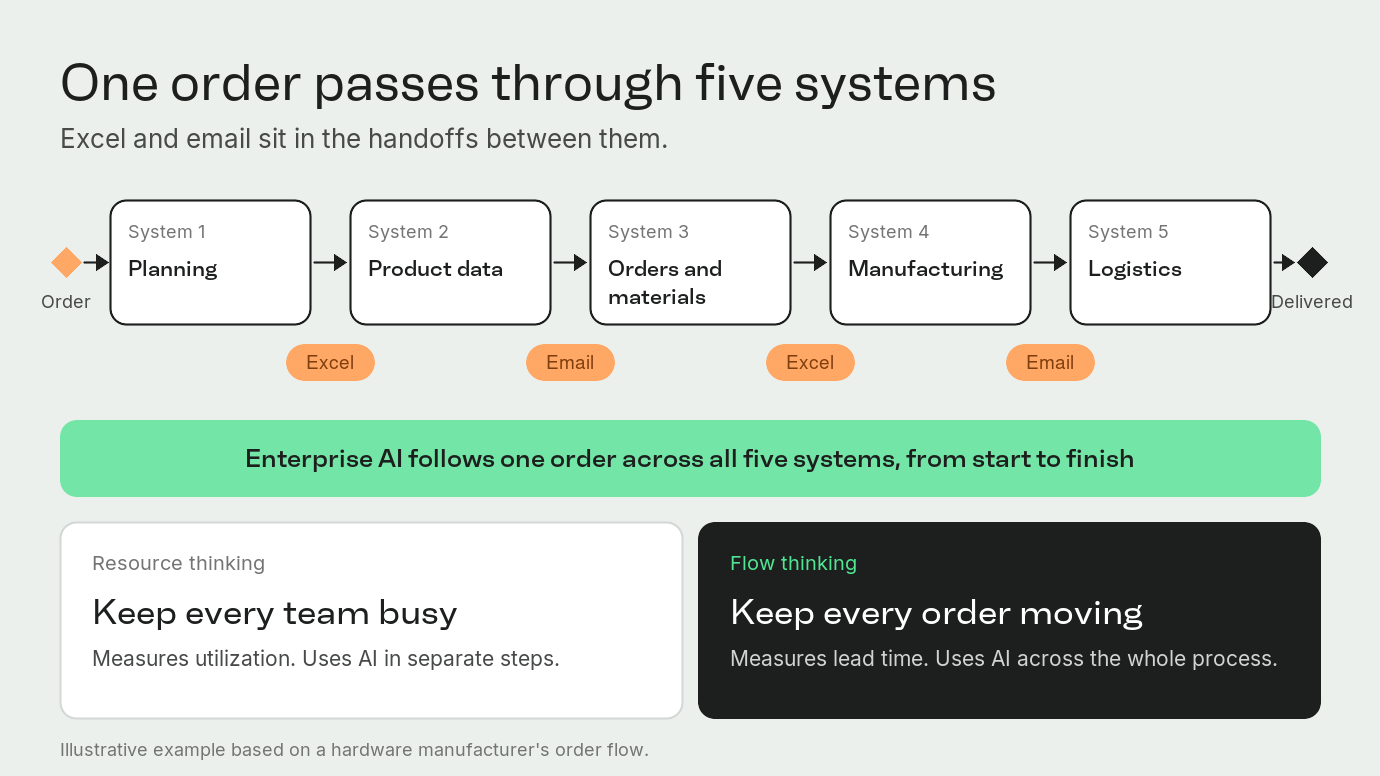
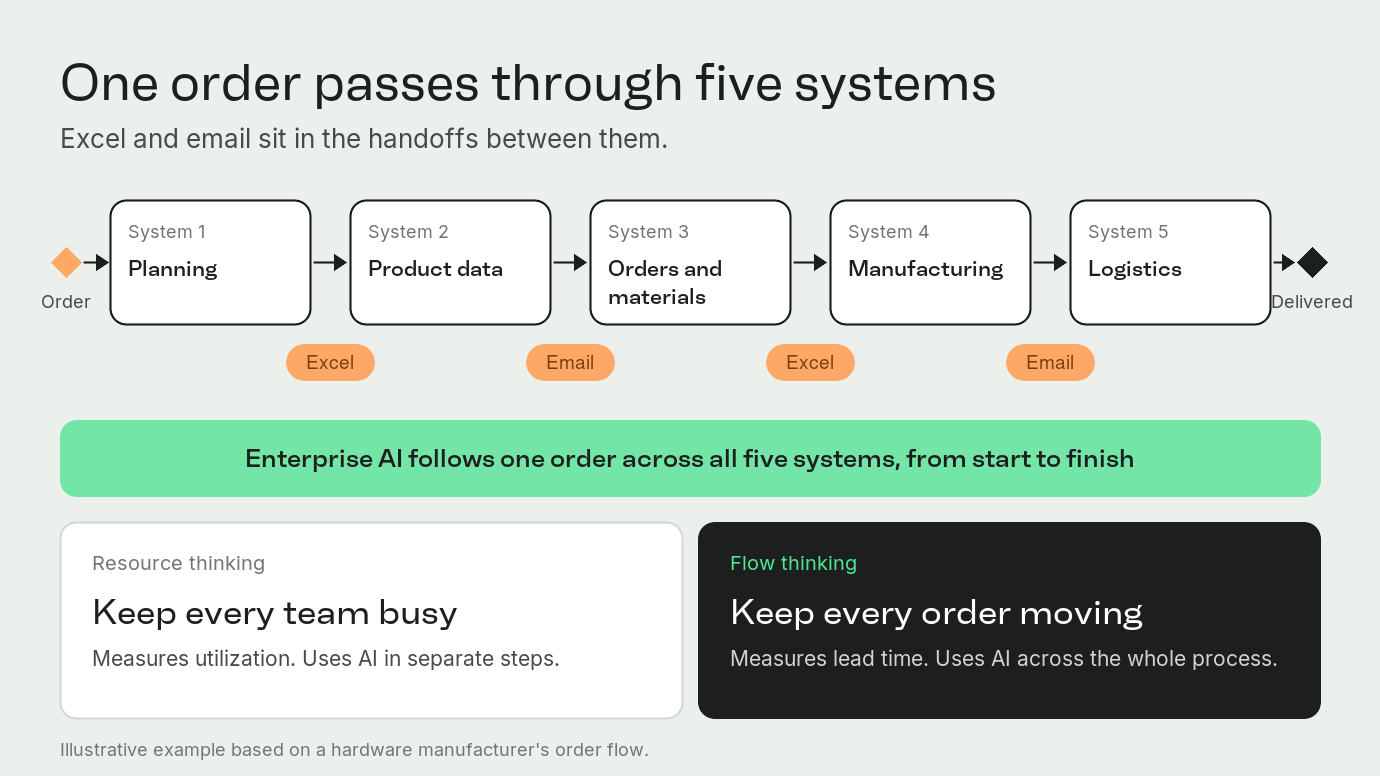
There are two ways to manage a process. Resource thinking asks how to keep every team busy. It measures how much of their time they spend working, and it uses AI in separate steps. Flow thinking asks how to keep every order moving. It measures lead time, which is the time from order to delivery, and it uses AI across the whole process.
A global hardware manufacturer shows the difference. An order there passes through planning, product data, orders and materials, manufacturing and logistics, with Excel and email in between. Teams spent hours in meetings to learn an order's status. The chief operating officer visited every station to see where things stood. Bottlenecks showed up after they had already caused delays.
After the company put Qlerify Live on its order flow, the customer story reports:
Work through these six in order.

Write down how the process runs today. Answer these questions:
A common mistake is to automate a slow process before fixing it, which only speeds up the same problems.
In Qlerify Live, your own people map the real process in an Event Storming workshop. In this workshop, the group lays out the process step by step on one shared board. Steps that happen in email, Excel or meetings go on the board too.
AI must work with the systems you already run. These include order and finance systems, customer systems, document storage, databases and email. This is often the hardest part.
Qlerify Live works with any system that has a connector. A connector is the piece of software that lets one system share data with another. Product design, manufacturing and quality systems qualify, and so do older in-house systems. If a connector does not exist, we build one with your IT team.
You do not need one large central data store. You need to know where each piece of information lives, who owns it, how reliable it is and who may use it.
Take an AI that handles customer orders. It must tell current price lists from old ones, and it must know which stock balance is valid. If the data is poor, the AI spreads the errors automatically, at scale.
A language model is the part of AI that reads and writes text. It does not run workflows, connect systems or fetch the right data. It also does not tell you when something breaks. You normally need five components:
This step turns a demo into a process the business can rely on. Four situations come up sooner or later: information is missing, the AI misreads something, a system goes down, or a decision needs a person's approval.
A good setup does five things:
In Qlerify Live, a person approves every AI action before it reaches your systems. Later, you can let agents carry out specific steps within limits you set.
The U.S. National Institute of Standards and Technology (NIST) published its AI Risk Management Framework in January 2023. Companies use it on a voluntary basis, and NIST is revising it. The framework has four functions: govern, map, measure and manage. In our reading, step 1 above is close to map, step 5 covers govern and manage, and step 6 covers measure.
Track how well the process works. Useful measures include:
Measure before you automate. Without a starting point, you cannot judge the financial benefit.
In Qlerify Live, you start with the median and 85th percentile lead time for the whole process. The 85th percentile is the time within which 85 of every 100 cases finish. The system also flags cases that wait longer than a step's usual pace.
A typical rollout takes about six months:
We packaged these steps in Qlerify Live. A process that normally takes six months takes us four weeks. The six-month plan is an illustration, and complex or business-critical processes can take longer.
The setup is five workshop sessions on top of your systems:
A company can hire a consultant to automate invoice handling. That can work well, and it leaves you with one automated process. The alternative is a capability: a set of things you use again, such as shared integrations, technical components, a way to judge business benefit, security rules and trained people.
With a capability in place, the second process starts with the integrations, security rules and measurement already done. Automation stops being a series of separate efficiency projects and becomes a way to keep improving how the whole company works. Leaders can then see which orders are waiting and why.
Pick the process where work waits longest. Bring its owner, the people who know the work and one person from IT. Read more about Qlerify Live or book a demo.